Social Media Scheduling Software: 2026 Buyer's Guide + Calendar
Compare scheduler limits, costs and approval rules, then test the shortlisted tools with your own workflow. Includes a free copyable calendar template.

Introduction
Social media scheduling software can save the wrong task. Your editor may be waiting for a verified product claim or the client's approval. A larger publishing queue doesn't resolve either delay. Before paying, name the part of delivery that currently fails and check whether the proposed plan actually fixes it.
We'd shortlist by account requirements, approval responsibility and complete cost, then run a real assignment through the trial. This buyer's guide compares provider documentation checked on 8 November 2026. It isn't a hands-on reliability test. The calendar template and trial checklist below show how to evaluate the fit with your own accounts.
Table of Contents
- 1. Introduction
- 2. Why a long list of scheduling tools rarely helps
- 3. Choose social media scheduling software with seven checks
- 4. Shortlist documented options by the job you need
- 5. Calculate cost using your real account structure
- 6. Build a calendar that stays useful outside the tool
- 7. Keep the social media calendar 2026 flexible
- 8. Trial social media scheduling software before buying
- 9. Conclusion: buy the workflow your team can verify
- 10. FAQs
Why a long list of scheduling tools rarely helps
Separate planning from publishing
A planner organises ideas, drafts and review. A scheduler holds approved work for delivery to connected accounts. A broader management platform may add other tasks. Buying all of them together makes sense only when the team will use those capabilities.
In a real Reddit question, a new manager wanted affordable scheduling for a small client's accounts and found recommendations difficult to judge. Another manager described a price increase across multiple accounts. Those are different buying problems, even though both ask for the best app.
We'd write down the failed task before opening a comparison page. Is it forgetting to publish, finding the approved creative or waiting for a product claim? A new interface won't resolve all three in the same way.
Compare the plan you will actually buy
A tool can advertise approvals while reserving the required workflow for another tier. A free allowance can mean queue capacity, monthly usage or a trial that never resets. Read the definition beside the number.
At Mommantum, we'd evaluate the complete content-to-publication process. Keep the current planning document if it already works, and add software where it removes a clear delivery problem.
Don't turn popularity into evidence of reliability for your accounts. Provider documentation establishes advertised scope; a controlled trial establishes whether your team can use that scope in practice.
Choose social media scheduling software with seven checks
Start with the tasks that cannot fail
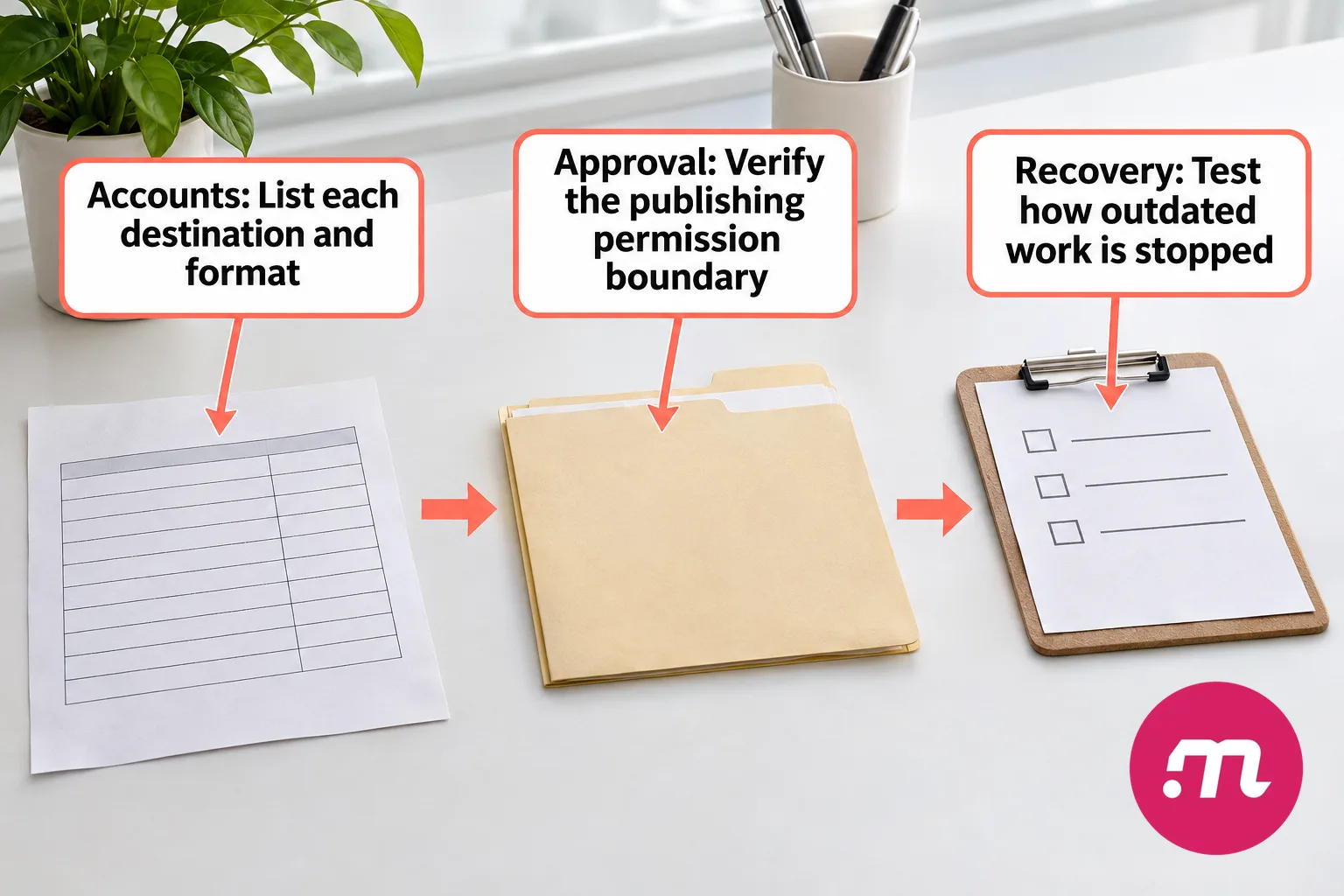
- List every account and required format. Confirm what publishes directly and what needs manual completion.
- Count channels, users and brands using the provider's billing definitions. Similar headline prices can describe different units.
- Check the exact approval rule on your intended paid tier. Optional review is different from a required publishing gate.
- Identify queue capacity and post-creation limits. Ask what resets and what happens when you reach the cap.
- Test the time zone, destination link and live result. A scheduled label isn't proof that publication succeeded.
- Find the correction process. Decide who receives failures, reconnects accounts or stops an outdated offer.
- Review the complete commitment and handover. Include billing period, add-ons and the records you need if you leave.
Use a pass-or-fail trial brief
Give shortlisted tools the same assignment. Use an approved creative and caption with a working destination. Ask the actual approver to review it, then inspect whether an unauthorised editor can publish prematurely.
We'd treat a missing required format as a failed fit, even if the dashboard looks excellent. A feature that saves reporting time cannot compensate for the inability to deliver your normal work.
Record which steps remain manual. Manual completion may be acceptable when someone owns it and the workload is realistic. It becomes a problem when a team assumes the queue will do everything automatically.
Shortlist documented options by the job you need
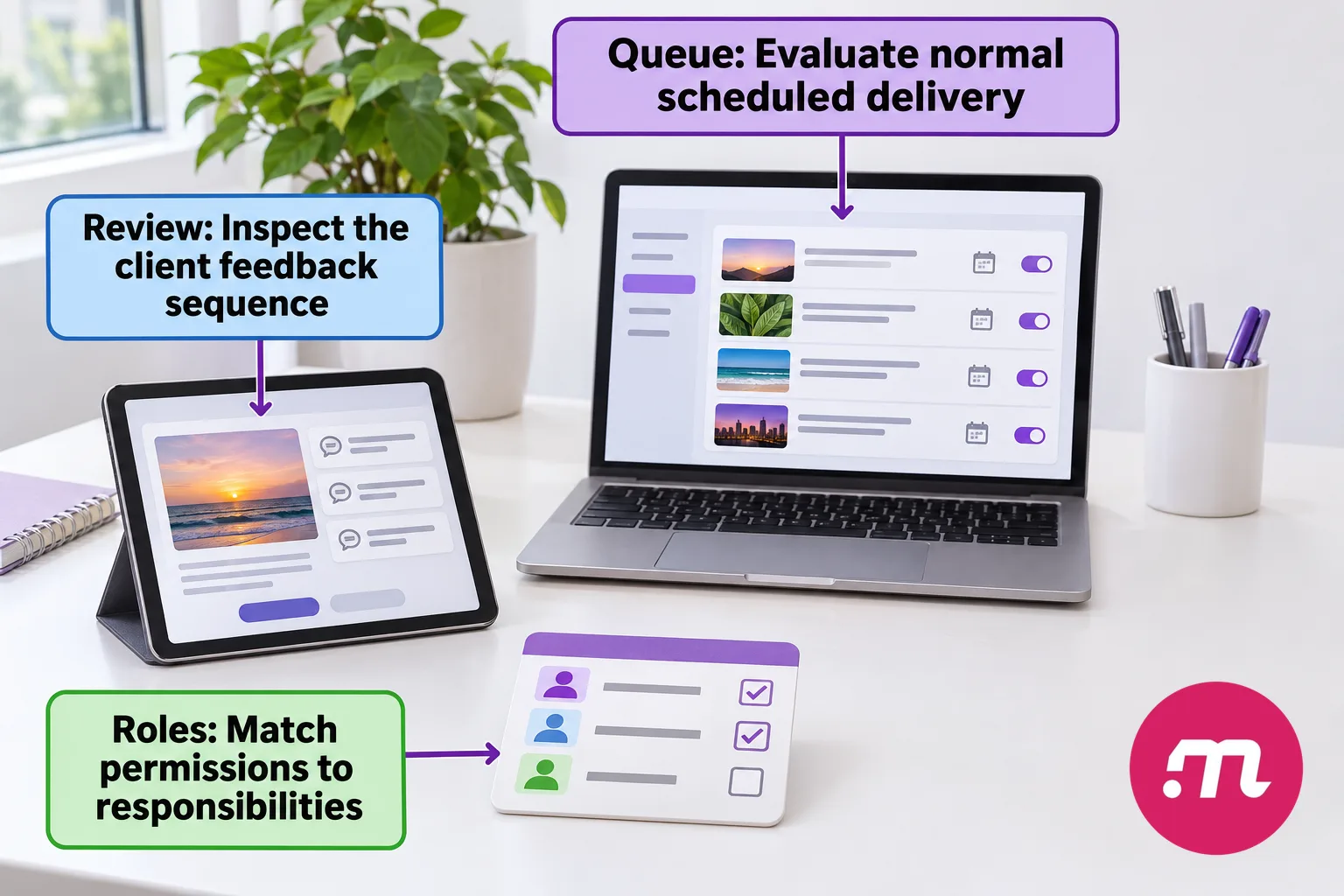
Buffer for a straightforward queue to evaluate
Buffer's pricing page lists a Free plan for up to three channels and ten queued posts per channel. Its Essentials annual option is advertised at US$5 per channel per month, billed US$60 yearly for one channel. Team lists approval workflows and unlimited team members. Check your selected tier and billing period.
We'd shortlist Buffer when queue management is the immediate gap. Its support documentation clarifies that the free post limit is queue capacity at a time, not a monthly allowance. Test your formats and account requirements before treating that capacity as sufficient.
Planable for evaluating collaborative review
Planable's trial documentation says the first fifty created posts form a one-time allowance with no time limit. It isn't a permanent free plan. The allowance doesn't reset when you delete posts. The same page lists Basic at US$39 per workspace monthly or US$390 yearly.
We'd use that trial to evaluate the actual review sequence. Confirm the approval capability you need remains available on the paid tier you select; trial access doesn't establish long-term entitlement.
Zoho Social for a role-based approval check
Zoho Social's approval guidance describes limited publishers who save drafts and submit them for approval, rather than schedule or publish directly. We'd consider that model when responsibility and publishing permission need a clear boundary. Verify plan availability and account setup before committing.
| Option to evaluate | Main buying question | Trial priority |
|---|---|---|
| Buffer | Does the queue cover your normal delivery work? | Required formats and account behaviour |
| Planable | Does the selected tier support the review you need? | Client feedback and approval sequence |
| Zoho Social | Can publishing permissions match your responsibilities? | Draft submission and approver roles |
| Simple planning document | Do you mainly need organised briefs? | Current version and approval visibility |
Calculate cost using your real account structure
Compare billing units before currency amounts
A per-channel charge grows with connected accounts. A workspace charge depends on how the provider groups clients or brands. A user charge grows with seats. Record these units before comparing totals.
Don't compare an annual monthly equivalent with a monthly cancellable subscription as though the commitments match. Record the amount due now and the annual obligation separately. Check which reporting or inbox capabilities are add-ons.
For an Indian budget in ₹, use the final payable quote or card charge, including applicable tax and currency conversion costs. We wouldn't publish a made-up rupee conversion for a dollar price or assume today's exchange rate will hold at renewal.
Build a comparison record with one line per shortlisted plan. Write the billing unit, included accounts and people, required add-ons, upfront charge and renewal basis. Add a plain explanation of why the plan qualifies. That makes it easier to spot when a low starting price applies to a different account structure from yours.
Count the work left outside the tool
Filming, editing and factual approval still need people. If the cheaper plan moves more work back to your staff, include that capacity in the comparison. Software can reduce repetitive delivery work without making production free.
Ask what happens when an account is added, a client leaves or the team needs another approver. Keep a record of billing assumptions so the next invoice is understandable.
We'd begin with the narrowest plan that passes the trial. Paying for a larger bundle can be reasonable when it replaces work you actually do; we'd leave capabilities out of the purchase decision when nobody owns or uses the work they support.
Build a calendar that stays useful outside the tool
Copy this free working template
Use this social media calendar template in your existing document or planner. Each assignment needs the information below, whether the final destination is a spreadsheet, a database or a scheduler.
| Field | What to record |
|---|---|
| Slot and account | Date, time, time zone and destination account |
| Buyer question | The problem the post should answer |
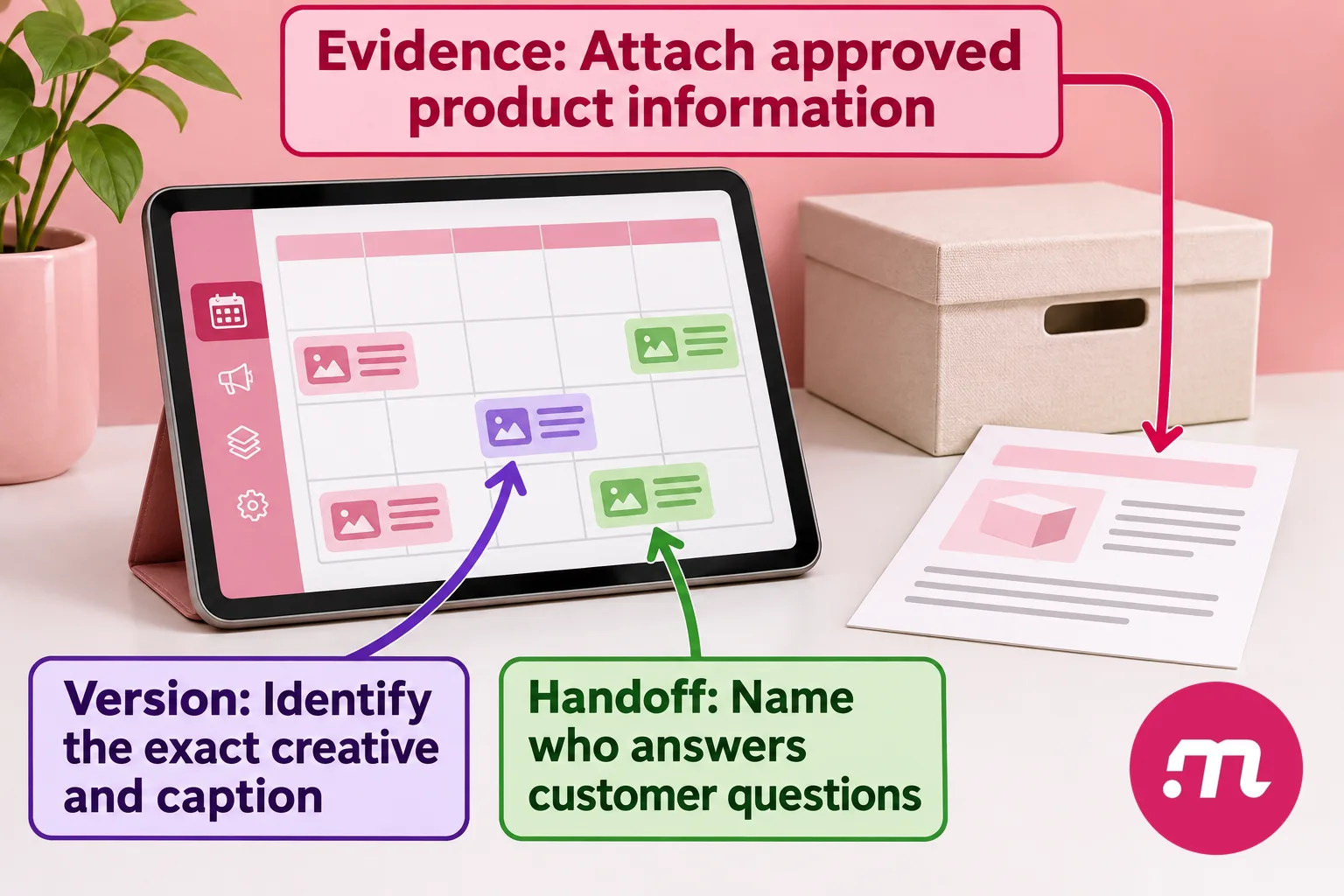
| Evidence | Approved facts and source material |
| Draft version | The exact creative and caption under review |
| People | Producer, approver and reply owner |
| Status | Idea, drafting, review, approved, scheduled or published |
| Next action | The matching page or staffed conversation |
| Review note | Observed response and next decision |
Test it with a real assignment
For an illustrative homeware post, the buyer question might concern whether a storage box fits a shelf. The evidence is an accurate measurement and actual demonstration. The destination should show the matching product information, with someone able to answer follow-up questions.
Clear the creative and caption together. If the offer changes afterwards, update the draft and approval before scheduling. We'd prefer a delayed post to a queue entry whose product claim is no longer true.
A social media content calendar is useful when the team can find the current assignment and its owner. Check whether the approver can actually find the cleared draft during a busy week. Keep those records available during a tool change so the work doesn't become dependent on one interface.
Keep the social media calendar 2026 flexible
Use verified occasions as planning inputs
The Government of India's Pr. CCA Delhi 2026 holiday list includes Diwali on 8 November, Guru Nanak's Birthday on 24 November and Christmas Day on 25 December. It states a central-government office context. These are useful date references, not your courier's delivery commitments.
Choose occasions relevant to your customers. Confirm stock and operating arrangements before scheduling a commercial promise. A regional-language message also needs someone able to check its meaning and handle the replies.
We wouldn't fill every festival slot simply because a tool suggests it. A factual answer to a current customer question may deserve the space more than an unrelated greeting.
Keep planned work replaceable
The claim that the calendar is dead challenges rigid grids, but doesn't establish that launches and approvals need no preparation. Separate stable explanations from offers that require a late check.
When something changes, pause the unsuitable assignment and record the replacement. Keep the displaced evergreen draft if it remains useful. Flexibility should change priorities without erasing approval responsibility.
Use AI to suggest angles from approved customer questions. Verify its output before it enters the queue. We'd keep claims and delivery promises with the responsible person rather than treat generated captions as approved facts.
Trial social media scheduling software before buying
Inspect the result instead of trusting the queue
Connect only the authorised accounts and confirm roles. Create the draft, obtain approval and check the publication slot. Where a live test is appropriate, use approved material and inspect the actual result, including the link and format.
Check how failures appear and who receives them. Practise stopping a scheduled message before an offer changes. A tool that makes corrections difficult can create more work during a busy campaign.
We'd record the manual steps and choose the option the team can maintain reliably. No documentation review can promise that every future publication will succeed.
Use the same review record for each candidate:
| Trial check | Evidence to keep |
|---|---|
| Draft review | Can the approver see the exact creative and caption together? |
| Permission boundary | Can the intended editor publish before required approval? |
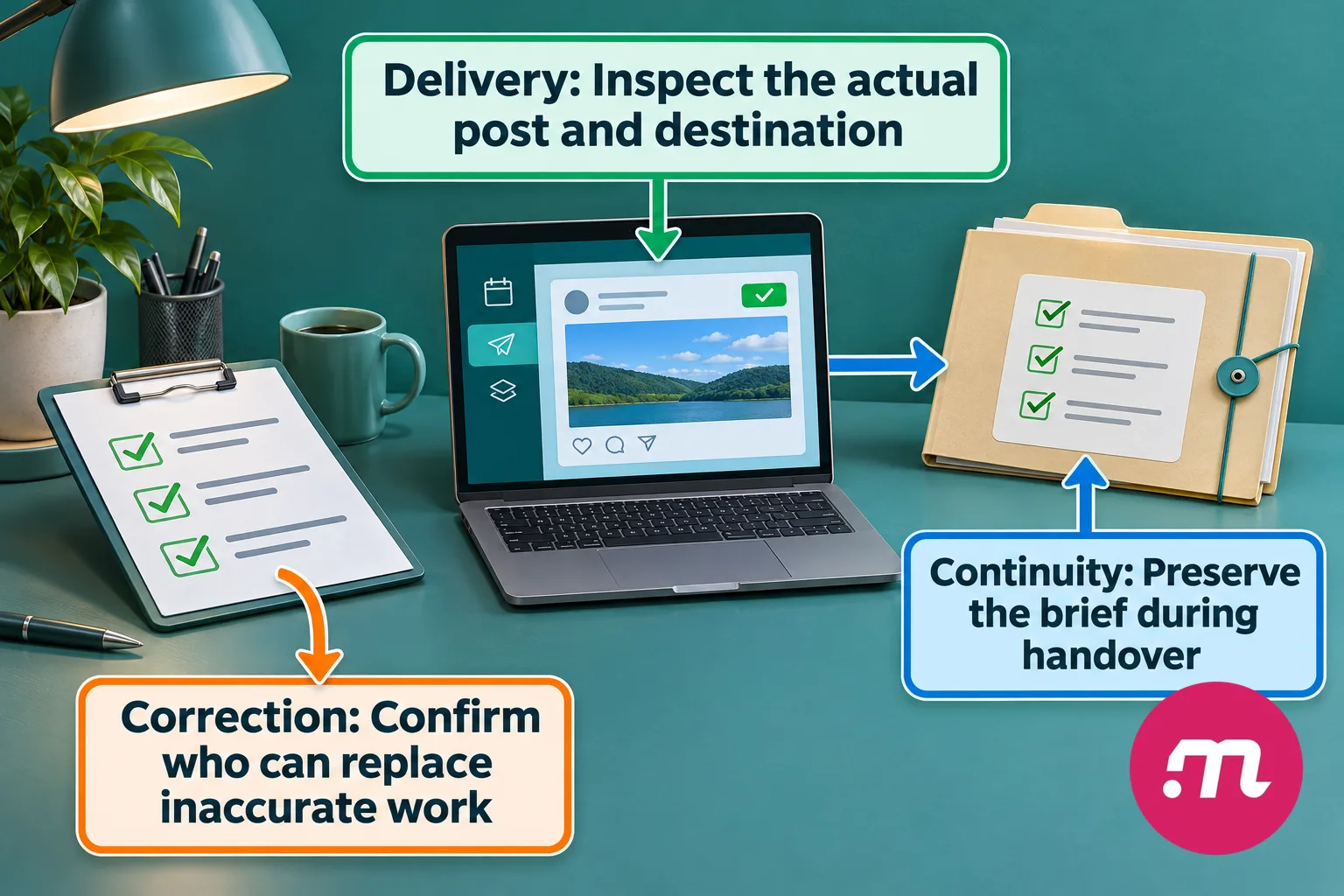
| Delivery | Does the actual post match the approved format and destination? |
| Correction | Can the responsible person stop or replace outdated work? |
| Continuity | Can the team recover the brief and approval during handover? |
Mark a check unresolved when you haven't verified it. A sales demonstration is useful for asking questions, but it doesn't replace trying the workflow with your own permissions and account setup. If the trial exposes a manual step, decide who owns it before calling the candidate suitable.
Keep delivery and performance reviews separate
Review failed publications and delayed approvals as workflow issues. Review suitable enquiries or relevant visits against the purpose of the content. A scheduler's activity report doesn't establish incremental revenue.
Before changing tools, identify future queued work and prevent duplicate delivery. Preserve the current drafts and approvals using the provider's available methods. Keep account ownership and exit responsibilities clear.
Our social media planning and management work treats these responsibilities as part of delivery. We'd resolve the handover before calling a migration complete.
Conclusion: buy the workflow your team can verify
Choose software that passes your account, format and approval checks at a complete cost you understand. Use the free template to keep the brief clear, then test delivery and correction before expanding. The best fit is the one that solves your actual missing task.
Book a free strategy call through our social media marketing service. Bring your account list and an assignment that got stuck. We'd identify the workflow gap before recommending another subscription.
Frequently Asked Questions
Key takeaways and practical details on this topic.
The best social media scheduler for a small business is the plan that supports its real accounts, formats and approval responsibilities at a complete cost it can maintain. We'd test the same assignment in shortlisted tools before choosing. A popular platform isn't automatically suitable when a required format or publishing permission is missing.
Create a social media calendar by choosing a customer question and intended business action, then recording the evidence and draft required. Add the publication slot, approval status and responsible people. We'd test a small working batch before filling a month. The calendar should make the current version clear and show who handles replies after publication.
A social media content calendar should include the buyer question, evidence, draft version and intended next action. Record the account, time zone and people responsible for production, approval and replies. We'd keep scheduled and published as separate statuses. A queue entry isn't proof that the live post appeared correctly or that its destination works.
Free social media scheduling software can cover limited requirements, but its allowance needs careful reading. Buffer lists a free option for up to three channels with ten queued posts per channel. We'd check required formats and account behaviour before relying on it. A trial that allows a fixed number of created posts is a different offer.
Planable's provider documentation describes a free trial covering the first fifty created posts, with no time limit, rather than a permanent free plan. The allowance doesn't reset when posts are deleted. We'd use it to test the review process and confirm which paid tier retains the approval capability you need before committing.
Social media scheduling software costs depend on channels, workspaces, seats and add-ons, as well as the billing period. We'd compare the full commitment for your account list rather than a starting monthly equivalent. For an Indian budget, record the final payable amount in rupees, including applicable tax and conversion costs, without assuming a dollar price has a fixed rupee value.
A planner can organise content without scheduling it automatically. Use the template in this article in a document or spreadsheet, with clear draft versions and approval responsibility. We'd start there if coordination is the main problem. Add a publishing tool when it removes a specific delivery task, while keeping someone responsible for verifying posts and handling replies.
The content calendar remains useful when it records work and can change with customer needs or business facts. Criticism of rigid monthly grids doesn't prove that preparation is obsolete. We'd keep evergreen drafts ready and check changing offers near publication. Flexibility should let you replace unsuitable work without bypassing factual approval.
Test your small client's actual formats, account connections and approval process before choosing a paid tool. Use an approved draft and inspect the destination and live result when a live test is authorised. We'd also record manual steps and queue limits. The right fit needs to handle normal delivery, not just produce a convincing demonstration.
Compare alternatives using the full account list and each provider's billing unit, then record the upfront charge and renewal basis. Confirm required users and add-ons before comparing totals. We'd test the workflow before moving future posts and plan how to prevent duplicate delivery. A lower headline price isn't enough if the account structure or manual workload differs.
Keep the queue responsive by separating stable explanations from offers that need a late factual check. Name who can pause outdated work and approve its replacement. We'd retain the displaced evergreen draft when it remains useful and record the reason for the change. A scheduled label shouldn't force publication of a promise your business can no longer support.
Publishing software may be unnecessary when your main gap is organising briefs, draft versions and approvals. Test a simple planning document first and identify any delivery work it leaves unresolved. We'd add software only when it solves that specific task. Keep the staff time for production and replies visible, because avoiding a subscription doesn't remove those responsibilities.
Ready to implement this for your brand?
Connect with our Jaipur growth studio to turn these strategies into revenue for your D2C or ecommerce business.